Change Management Process in OrionX
A Change is any change within the IT Infrastructure of an organisation that can affect the service of an organisation.
It is important that a Change is aligned with the organisation’s goals and provides value.
The ITIL definition of a Change is:
“The addition, modification or removal of any authorised, planned, or supported service or service component that could have an effect on IT services.”
Change Management is a process that helps organizations make changes to their technology systems in a controlled and efficient manner.
It ensures that any changes made to these systems are well-planned and do not disrupt the day-to-day operations of the business.
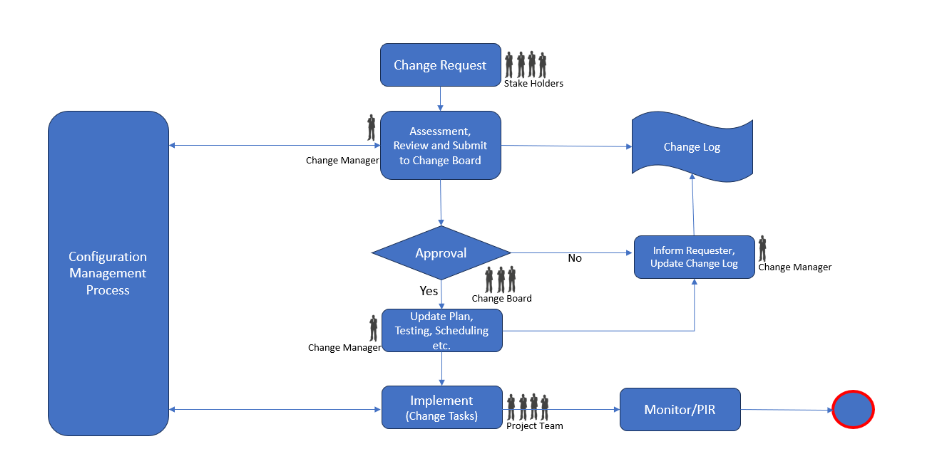
🛠 How ITIL Change Management Works
- Request
- Review / Assessment
- Approval
- Planning
- Testing
- Implementation
- Monitoring / PIR
🎯 Key Takeaway
Following this process helps organizations reduce system failures, improve change quality, and maintain reliable technology infrastructure.
🔁 Change Management Workflow Diagram
📌 Change Types in ITIL
IT change management classifies all changes as standard, emergency, or normal, and relies heavily on automation where possible.
Standard Changes
Standard changes are low-risk and follow an established procedure.
Examples include:
- Software patching and updating
- Replacing outdated hardware
- Making DNS changes
Emergency Changes
Emergency changes are unexpected and must be implemented immediately to minimize the impact.
Examples include:
- Response to zero-day exploits
- Isolating networks from DDoS attacks
Normal Changes
Normal changes fall between standard and emergency changes and are further categorized by risk: - Minor - Significant - Major